
Icelandair
IcelandairTravel & Local
4.2146.00 Reviews
- Version
- 4.5.2
- Installs
- 500.00K
- Age Rating
- Everyone
Screenshots

Our Review of Icelandair
 Analysis by Appyee
When I travel with Icelandair, I want the airline’s own app to do a few practical things well: keep my trip details together, reduce the need to search through emails, and help me move from booking to airport without unnecessary friction. That is the role this Travel & Local app takes. It is free, made by Icelandair, and aimed at passengers who want a simple mobile companion for their journey rather than a general travel planner.
After using it as a travel-focused tool, I found the best way to judge it is not by how many extras it offers, but by how smoothly it supports the moments when travel becomes time-sensitive. Checking a reservation before leaving home, confirming flight information, and having the right details available while moving through an airport are more valuable here than decorative features. The app works best when it becomes part of a repeatable travel routine, not when it is treated as a complete replacement for every travel service.
How the everyday Icelandair workflow feels
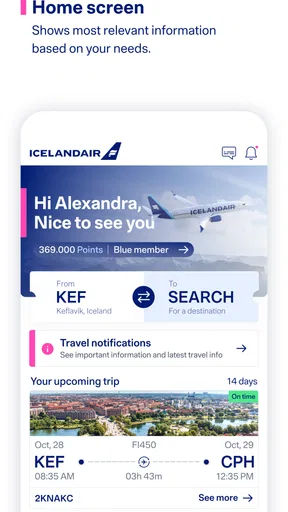
The natural starting point is to install the app before a trip and use it as the central place for Icelandair-related information. I would begin by checking that the itinerary shown in the app matches the booking confirmation already in my email. That small comparison is worth doing once, because it gives me confidence that I am looking at the correct trip before relying on the phone at the airport.
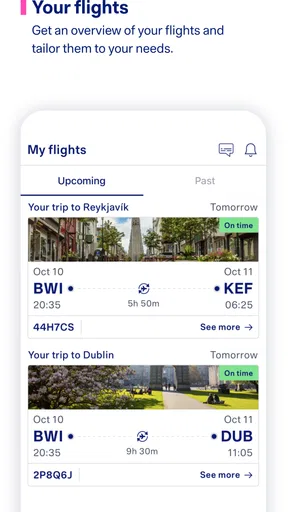
From there, my basic routine is straightforward. I open the app when I need to review the journey, check the relevant flight details, and return to it when the travel day gets closer. This is more convenient than repeatedly searching an inbox, especially when several booking emails, hotel messages, and airport notices are mixed together. The value is not that the app transforms the trip; it is that it gives Icelandair passengers a dedicated reference point.
A realistic example is a morning departure when I am packing the night before. Instead of opening several messages, I use the app to review the itinerary and make sure I am preparing for the correct flight. At the airport, I can use the same app rather than switching between a browser, an email account, and a separate airline website. That continuity is the strongest reason to keep it installed.
I would still keep my booking confirmation accessible elsewhere. Phones lose battery, connections can be unreliable, and travel plans sometimes involve more than one airline. The sensible habit is to use the app as the main Icelandair reference while retaining essential booking information in a second place. That is not a criticism unique to this app; it is simply good travel preparation.
The app is particularly useful for passengers who fly Icelandair often enough to appreciate a consistent routine. If I know I will be taking several Icelandair journeys, having one familiar interface is less mentally demanding than starting from a website every time. Occasional travelers can benefit too, although someone taking a single flight may find the airline’s mobile website sufficient if they do not want another app on their phone.
Its audience is clear. This is not a broad destination guide, a hotel comparison service, or a universal travel wallet. The developer is Icelandair, and the experience is centered on that airline’s journey. That focus makes it more relevant for Icelandair passengers and less useful for people who want one app to manage flights from many carriers.
What I check before relying on it
Before travel day, I would open the app while I still have time to correct an issue. I check the passenger and itinerary details, look for the flight I expect to take, and make sure I understand where the important travel information is located. Doing this at home is better than learning the interface while standing in a queue with luggage.
I also make a habit of reopening the app shortly before leaving. Travel information can change, and a quick review is more useful than assuming that yesterday’s plan is still the current one. The app should support that check, but I would not treat it as a substitute for paying attention to airport announcements or official messages.
One practical insight is to separate preparation from navigation. I use the app for the airline-specific part of the journey, while I use a maps app for getting to the airport and a calendar for the wider schedule. Trying to force one airline app to handle every part of a trip usually creates confusion. Icelandair’s app is strongest when I give it a defined job.
Another useful habit is to open the trip before entering a low-signal environment. Airport connectivity is often uneven, and the most stressful time to discover that I need to sign in or refresh information is while moving through a terminal. I prefer to review the relevant details in advance, then use the app for quick checks rather than depending on a last-second download.
Settings and phone habits worth checking
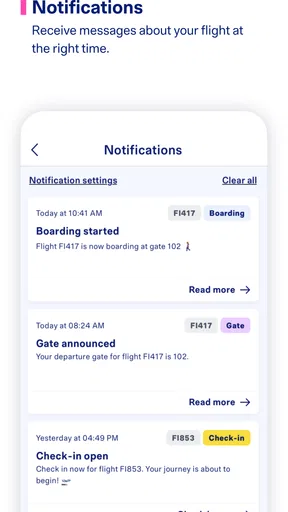
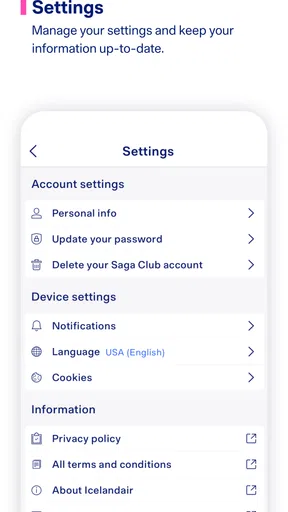
There are no settings I would change blindly. Instead, I would review the phone’s notification controls and decide whether Icelandair alerts should be allowed during the travel period. Notifications can be helpful when I am actively monitoring a journey, but I do not want every travel-related alert competing with messages from work or family. The right choice depends on how closely I want to follow updates.
I also check that the app is running on a phone version it supports. The listed minimum operating system is Android 7.0, which makes it accessible to many older Android devices. That is useful for travelers who do not upgrade phones frequently, although an older handset may still have limited battery life or slower performance. Compatibility alone does not remove the need to prepare the device properly.
Before departure, I would charge the phone, clear enough storage for normal app operation, and keep the screen lock method familiar. These are simple steps, but they matter because an airline app is only helpful if I can open it quickly when I need it. I also avoid signing out immediately after checking a trip unless I have a specific privacy reason, since repeated login steps are exactly the kind of friction that becomes annoying during travel.
Privacy-conscious users may prefer to sign out after the journey, particularly on a shared device. Frequent travelers may prefer to remain signed in for convenience. I see this as a personal trade-off rather than a reason to choose one approach for everyone. The important point is to decide before the airport, not while holding up a bag or passport.
The current version is 4.5.2, so I would keep the app updated through the normal app-store process rather than postponing updates indefinitely. Updating shortly before a flight can be risky if it introduces an unexpected login or interface change, so my preference is to update earlier, open the app afterward, and confirm that the itinerary is still easy to reach.
Faster patterns for repeat travelers
The fastest workflow is based on repetition. I use the same sequence every time: open the app, go straight to the active journey, review the key details, and close it once I have what I need. I do not browse around simply because the app is open. That keeps the tool focused and reduces the chance of overlooking the information that matters.
For a trip involving a connection, I would review the whole itinerary rather than looking only at the first flight. This is an important distinction. A passenger may feel prepared after confirming the departure, but the connection can determine how much time is available to change gates, collect information, or deal with a delay. The app can serve as the Icelandair side of that review, while airport signage and staff remain essential for what happens inside the terminal.
I also like to create a small pre-flight checklist outside the app: identification, boarding information, medication, charger, and any documents needed for the destination. The Icelandair app should not become a substitute for that checklist. Its strength is keeping the airline journey visible, while my own checklist covers the parts no airline application can organize for me.
One non-obvious advantage of a dedicated airline app is reduced context switching. When I use a general browser, I may have several tabs open and can easily land on an old booking page or a search result. A dedicated app narrows the path. For passengers who value speed more than exploring travel content, that focused design is a meaningful benefit.
The trade-off is equally clear: the narrower the app, the less it can help when my trip includes other airlines, trains, hotels, or complicated ground transport. In those cases, I would combine Icelandair with a broader itinerary organizer rather than expecting this single app to become the master record for the entire trip.
Where the app reaches its limits
I would not choose this app as my only travel tool if I regularly compare multiple airlines or need a single dashboard for several carriers. Its identity is tied to Icelandair, and that is both its reason for existing and its main limitation. A general travel app can be better for mixed-airline planning, while the airline’s own app is usually the more relevant place for Icelandair-specific journey information.
I also would not rely on any airline app as the sole source of urgent operational guidance. If a flight is disrupted, I would check the app, look for direct airline communication, listen to airport announcements, and ask staff when necessary. Digital information is convenient, but it does not replace human assistance when a connection is tight or a plan has changed suddenly.
Another limitation is that app convenience depends on the quality of the phone itself. A nearly empty battery, poor connectivity, forgotten login details, or an outdated operating system can turn a simple task into a problem. That is why my preferred workflow includes opening the app before leaving and carrying a charger or power bank. The application can simplify access, but it cannot solve every travel-day failure.
Some passengers may also prefer the website because they are uncomfortable installing airline apps or because they use different devices during planning. That preference is reasonable. The app is most compelling for people who want quick access from a phone and expect to manage their Icelandair journey while away from a computer.
The age rating is Everyone, which fits the app’s practical travel purpose. It is not a game or a social platform, and I would consider it suitable for a family member who simply needs airline information on a phone. Still, ease of use depends more on the person’s familiarity with smartphones than on the age label itself.
Who should install it and who can skip it
I would recommend Icelandair to passengers with an upcoming Icelandair booking, especially those who prefer a dedicated mobile workflow. It is also a sensible choice for repeat customers who want to stop searching through old messages every time they need to review a journey. The free price removes the usual hesitation about trying it before deciding whether it fits a personal routine.
I would be more selective for travelers with only one short trip and no interest in airline apps. If the booking email is already organized, the phone browser works well, and the passenger does not need repeated access, installing another application may add little. Likewise, people coordinating a complex multi-airline itinerary should pair it with a broader planning tool.
The public response suggests that the app has found a substantial audience: it has passed 500 thousand installs and holds a 4.2 average from about 2.1 thousand ratings. Those figures indicate useful adoption, but they should not replace personal testing. Airline apps are judged heavily by the exact moment they are needed, so I would install it before travel and confirm that the workflow feels comfortable on my own phone.
It has been available since December 5, 2019, giving it a longer presence than a newly launched travel utility. I see that as reassuring in terms of familiarity, but not as a guarantee that every passenger will prefer it. The right question is whether it makes my own Icelandair routine faster and clearer.
My verdict after building a repeatable routine
My overall view is positive, with a clear boundary around what the app is meant to do. Icelandair is a focused companion for Icelandair passengers, not a universal travel command center. I appreciate that focus because it lets me reach airline-related information without navigating a general travel platform. The experience makes the most sense when I use it before departure, revisit it during the journey, and keep backup habits for battery, connectivity, and mixed-airline plans.
The most effective approach is simple: install it early, open the active trip before leaving home, review the itinerary as a whole, adjust notifications to suit the travel period, and keep essential details available through a second channel. Those habits make the app more dependable than simply downloading it and hoping it will solve everything at the airport.
For an Icelandair customer, I would recommend giving it a try because it is free, supported on Android 7.0 and later, and designed around the journey that matters to that passenger. For someone who wants broad travel comparison, hotel planning, or one place for several airlines, another tool will be a better center of gravity. My final recommendation is to use the app as a focused airline companion, while keeping your wider travel plan and emergency backup separate.
That balance is why I would keep it available for an Icelandair trip. It does not need to replace every travel app to be worthwhile. It simply needs to make the airline-specific parts of my journey easier to find, easier to revisit, and less dependent on digging through a crowded inbox.
Verdict
Strengths of Icelandair
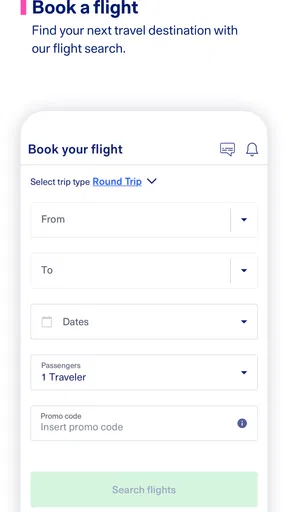
- Easy booking and itinerary management in one app.
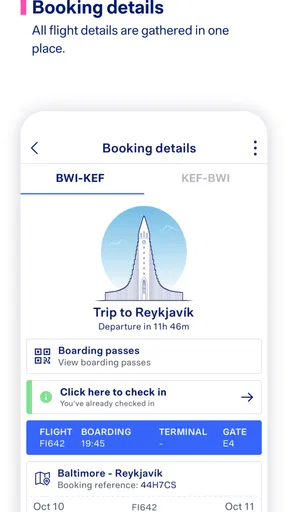
- Mobile check-in and boarding passes save time at the airport.
- Real-time flight updates help you track schedule changes.
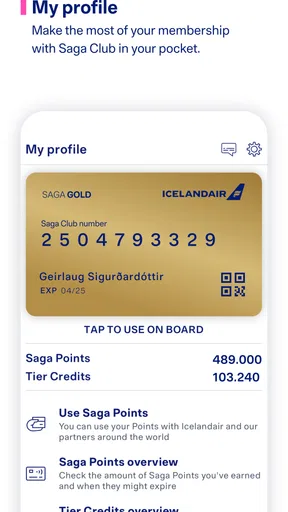
- Manage Saga Club membership and view loyalty benefits.
- Useful travel information for Icelandair destinations.
Limitations of Icelandair
- Some features may require a stable internet connection.
- Flight changes or refunds may still require contacting support.
- App performance can vary on older smartphones.
- Not all airport services are available in the app.
- Extra fees may not always be clear until late in booking.
Similar Picks in This Category
View All
Google Maps
Google LLC3.4

Google Maps Go
Google LLC4.1

Booking.com: Hotels & Travel
Booking.com Hotels & Vacation Rentals4.8

Google Earth
Google LLC3.8

Skyscanner Flights Hotels Cars
Skyscanner Ltd4.8

trivago: Compare hotel prices
trivago N.V.4.4
Frequently Asked Questions
What can I do with the Icelandair app?
The Icelandair app is designed to manage most parts of your journey from a mobile device. After signing in or retrieving a booking, you can check flight details, review schedules, access mobile check-in when available, view boarding information, and receive travel updates. It can also help you manage reservations and keep important trip information in one place instead of relying only on printed documents or email confirmations.
Can I check in and get my boarding pass through Icelandair?
In many cases, yes. The app provides access to Icelandair’s mobile check-in process and can display a digital boarding pass once check-in is completed. Availability may depend on your route, passenger details, airport rules, and whether your booking contains special requirements. It is still sensible to arrive with enough time for baggage drop, document checks, or assistance, and to keep your booking reference available if the pass cannot be displayed.
Does the Icelandair app show flight delays and other travel updates?
The app can provide useful information about your itinerary, including flight status and operational updates when they are available. Notifications may help you follow changes such as delays, gate information, or schedule adjustments, although the timing and type of alert can vary by airport and situation. For important travel days, compare the app’s information with airport screens and announcements, particularly during severe weather or disruption.
Can I manage baggage, seats, or other booking options in the app?
Depending on your reservation and the services available for your route, Icelandair may let you review or modify selected booking details through the app or its connected booking tools. Options can include seat selection, baggage-related information, passenger details, and other extras. Not every change is available for every fare or itinerary, and some requests may require contacting Icelandair directly, especially when a booking includes multiple passengers or special assistance.
Is the Icelandair app free, and what should I know before downloading it?
The Icelandair app is generally free to download, but using it requires an internet connection for downloading updates, retrieving booking information, or displaying newly loaded travel documents. Your mobile provider may charge for data, particularly while roaming abroad. Before traveling, sign in and load your itinerary or boarding pass in advance, enable notifications if desired, and make sure your phone has enough battery for airport use.
